
You can submit a dispute. We will investigate the issue and make necessary fund transfer to your account if the case is in your favor. We advise our users to communicate on our platform so we have proof and evidences to investigate if there is a dispute.
You can submit project as long as your credit is available. You can check your project credit by going to your dashboard and look for the right side widget that shows “Current Plan“. The “Project Allowed” indicates how many project you can submit.
When you purchase a service, money will be deducted from your wallet. If your wallet amount is not enough to purchase the service, you can top up your wallet using the “Fund Deposits & Invoices” menu. We accept top up using PayPal (automatically added to your wallet) and internet banking (depending in your location and require manually approval).
Selecting “Set to Inactive” will hide the project from visitors and move it to your “Inactive Projects” list. You can reactivate the project at any time. Choosing “Cancel” will permanently remove the project from your list, and you’ll need to create a new project if you wish to replace it.
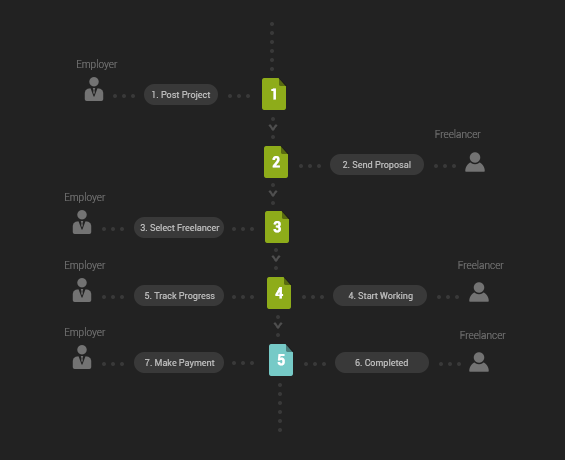
Below diagram shows the high level process flow of how employer and freelancer interact from the perspective of Employer.
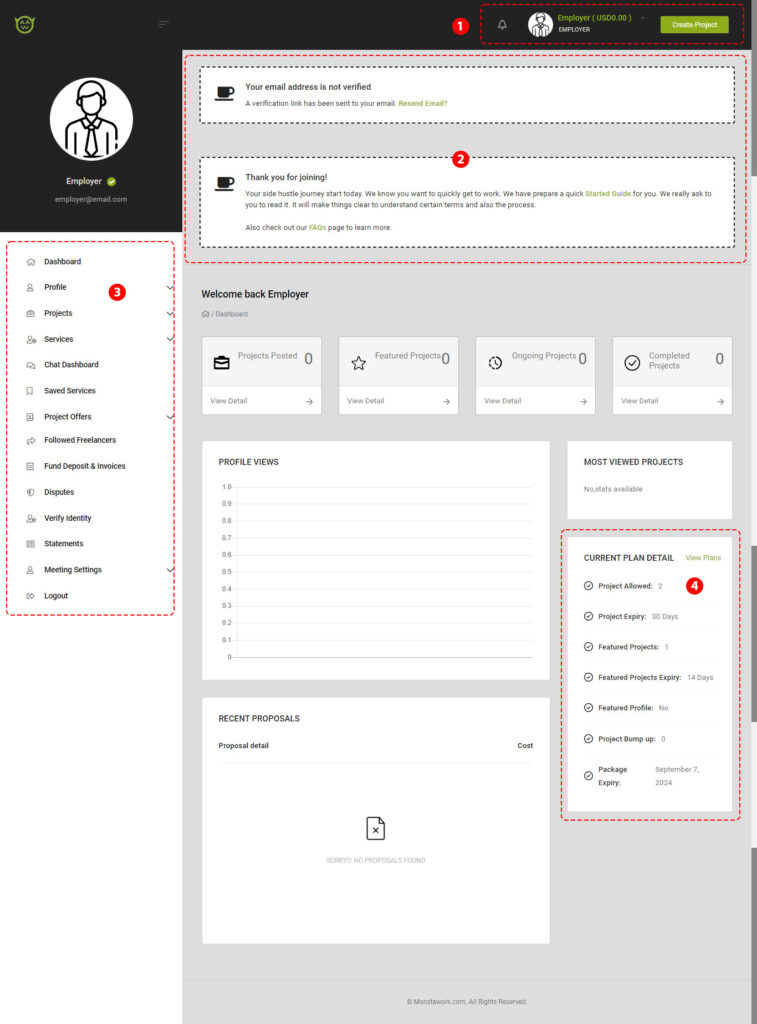
Below is the Employer dashboard.
The left menu is where most of the actions take place. In this guide we will look at 4 menus which you will use the most.
Credits enable you to perform actions such as posting a project. These credits are included with your package. When you sign up, you receive a package with a specified amount of credits based on the package assigned at that time. If you sign up during a promotional period, you may receive a package with additional credits.
Below is an overview of the credits included with your package upon signing up. Please note that the number of credits may vary depending on the timing of your sign-up. The credits available to you are displayed under the “CURRENT PLAN” section on your panel.
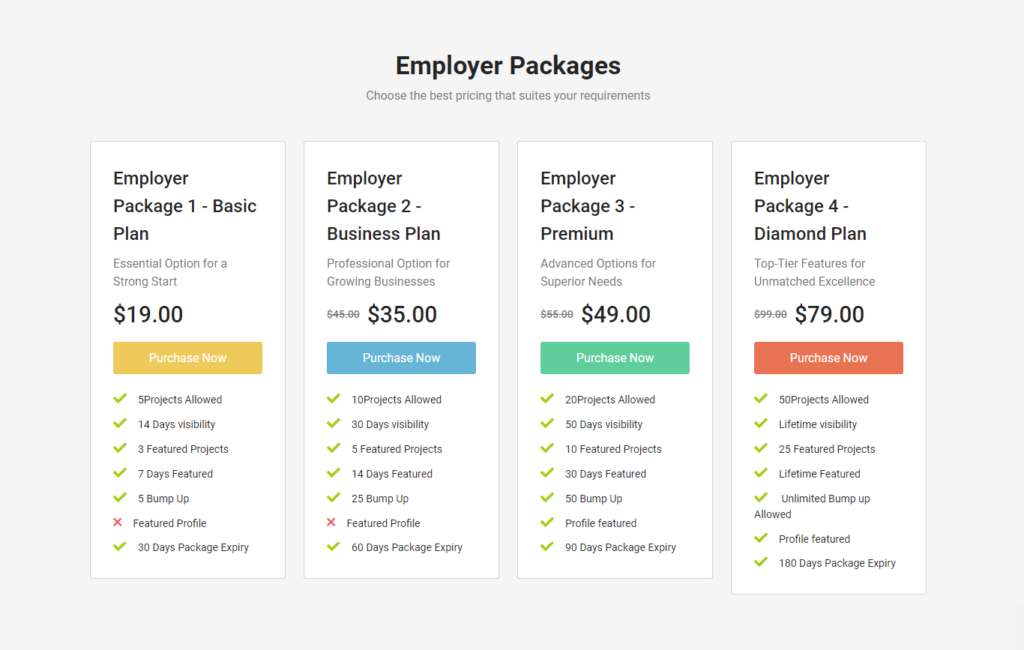
If you click on the “View Plans” link, it will show the package available for Employer to purchase. This purchase will add credits to your current plan.
You can purchase credits for your current plan at any time. The credits from the new package will be added to your existing balance. To view available Employer Packages, please visit the relevant section.
Below is a snapshot of the package options. Please note that prices and credits may vary, as we regularly adjust both to keep them up to date.
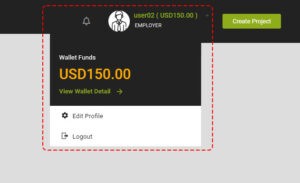
The Wallet is a tool for Employers to make payments to Freelancers. When you first create your account, your wallet balance will be zero. However, you can still post projects as long as you have sufficient credits. In the example below, the user already has some funds in their wallet.
You will use these funds to pay Freelancers for their work on your project. The example shows a proposal an Employer received from a Freelancer. After reviewing it, the Employer decides to hire the Freelancer by clicking the “Hire Now” button. Upon confirming the hire, a message will appear prompting the Employer to top up their wallet before proceeding with the hire.
Your wallet is also used when purchasing services from Freelancers. The amount will be deducted from your wallet when you confirm the purchase.
To add funds to your Wallet, go to the “Fund Deposits & Invoices” section in the left menu. Follow the instructions to complete the deposit. We accept payments via PayPal, internet banking, and cash deposit. PayPal payments are automatically approved, while payments via internet banking or cash deposit are processed manually.
If you need help, please reach out to us. You can send us email at support@dev135.freelansa.com or using our contact us form. If you need urgent help, use our chat button on the page.
This month, we're offering a free upgrade so you can start working immediately. The package, valued at RM250, includes credits to help you start selling your services and post projects. Whether you're just starting as a freelancer or looking for someone to assist with a task, Freelansa has got you covered.
A platform to work with IT professionals, programmers, artists and designers. Get the job done with highly skill professionals.